Cross-Section Titles
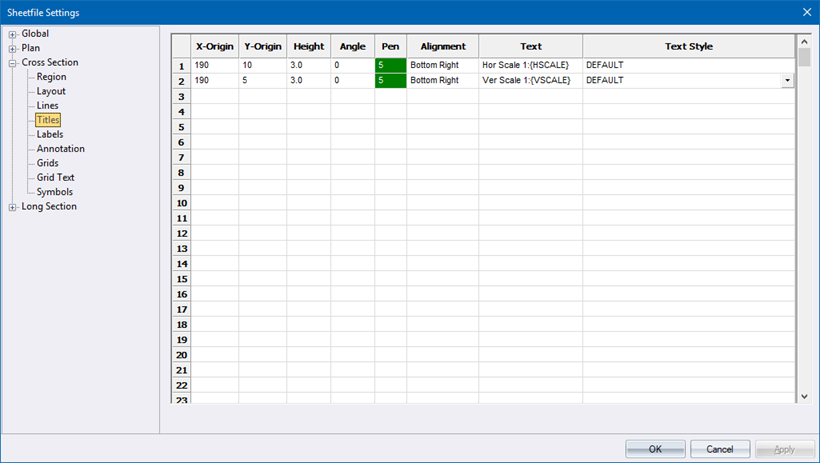
This page defines the titles that are plotted only once on each page and not at every section.
|
Option
|
Description |
|
X-Origin and Y-Origin |
Enter the position at which the text should be placed. |
|
Height |
Enter the height of the text in mm. |
|
Angle |
Enter the angle in degrees at which the text should be drawn. |
|
Pen |
Select the pen in which to plot the text. Right-click the cell to display the pen selection. |
|
Alignment |
Select the alignment of the text. |
|
Text |
Enter the text to be plotted. There are some predefined variables that can be entered here. Right-click the cell to select a variable from a popup menu. An explanation of the available variables is shown below:
|
|
Text Style |
Select the text style in which the text should be drawn. |
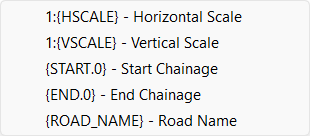
Available Variables
|
Variable
|
Description |
|
{HSCALE} |
The horizontal section scale. |
|
{VSCALE} |
The vertical section scale. |
|
{START.x} |
The chainage of the first section plotted on the page. |
|
{END.x} |
The chainage of the last section plotted on the page. |
|
{ROAD_NAME} |
The name of the Road that this cross-section applies to. |
The .x in the above variables can be substituted with a value that specifies the number of decimals to be displayed. For example, if the start chainage was 500 and the text item was specified as {START.3}, the text drawn would be 500.000.