Long Section Titles
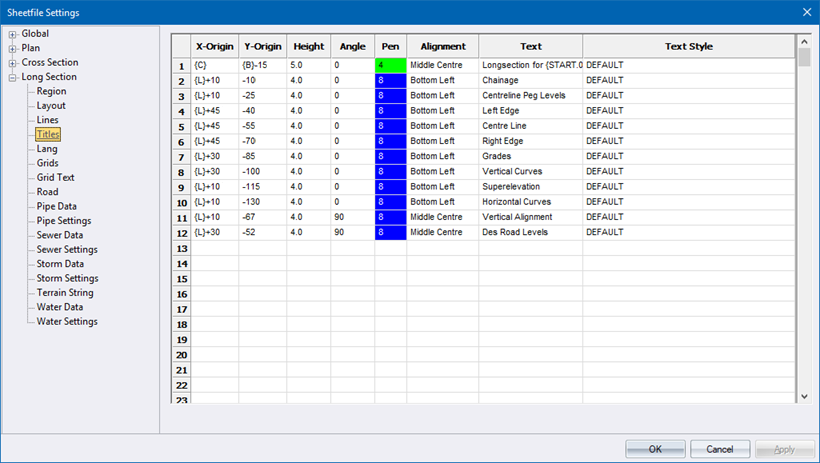
This page defines the text that will appear in each long section, and will typically identify the data in the detail area.
|
Option
|
Description |
|
X-Origin and Y-Origin |
Enter the position at which the text is to be placed, relative to the long section origin. There are some predefined variables that can be entered here. Right-click the cell to select a variable from a popup menu. An explanation of the available variables is shown above. |
|
Height |
Enter the height of the text in mm. |
|
Rotate |
Enter the angle at which the text should be written in degrees. |
|
Pen |
Select the pen in which to plot the text. Right-click the cell to display the pen selection. |
|
Alignment |
Enter the alignment for the text item. Enter the alignment of the text. Double-click the cell for a list of alignment options. |
|
Text |
Enter the text to be plotted. There are some predefined variables that can be entered here. Right-click the cell to select a variable from a popup menu. An explanation of the available variables is shown below:
|
|
Text Style |
Select the text style in which the text should be drawn. |
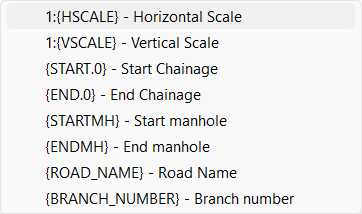
Available Text Variables
|
Variable
|
Explanation |
|
1 : {HSCALE} |
The horizontal scale of the longsection. |
|
1 : {VSCALE} |
The vertical scale of the longsection. |
|
{START.x} |
The start chainage of the longsection. |
|
{END.x} |
The end chainage of the longsection. |
|
{STARTMH} |
The first manhole of the longsection (for pipe plotting only). |
|
{ENDMH} |
The final manhole of the longsection (for pipe plotting only). |
|
{ROAD_NAME} |
The road name (for road longsections only). |
|
{BRANCH_NUMBER} |
The branch number of the current linkset. |
The .x in the above variables can be substituted with a value that specifies the number of decimals to be displayed. For example, if the start chainage was 375.25 and the text item was specified as {START.3}. the text drawn would be “375.250”.