Plan Road List Labels
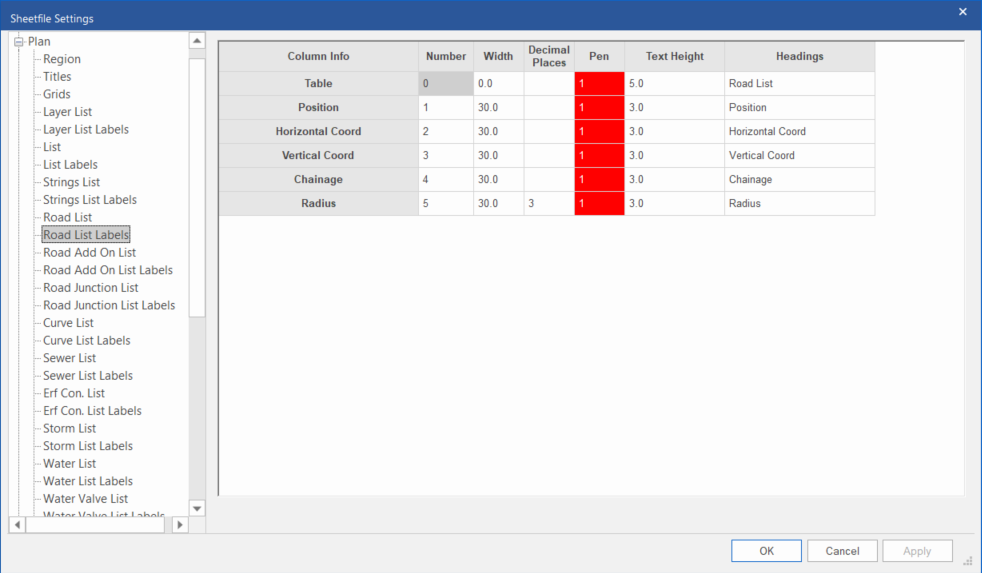
Define the label configurations for the Road List.
|
Option
|
Description |
|
Number |
Enter the column number in which the relevant item should be drawn. To ignore a particular item, set its column number to 0. |
|
Width |
Enter the width of the column in mm. |
|
Decimal Places |
The number of decimal places for the plotted data in this column. Does not apply to some columns (for instance “Table”, and columns which show names/IDs). Note: If you specify decimal places here, it will override the “default” number of decimal places specified in the Plan -> Road List grid. |
|
Pen |
Select the pen in which the table or column heading should be drawn. Right-click the cell to display the pen selection. |
|
Text Height |
Enter the text height of the table or column heading in mm. |
|
Headings |
Enter the text for the table or column heading. Multi-line text can be entered by entering the line feed character (\n) where necessary. Note that the same amount of line feeds must be inserted for all the columns. |