Plan Titles
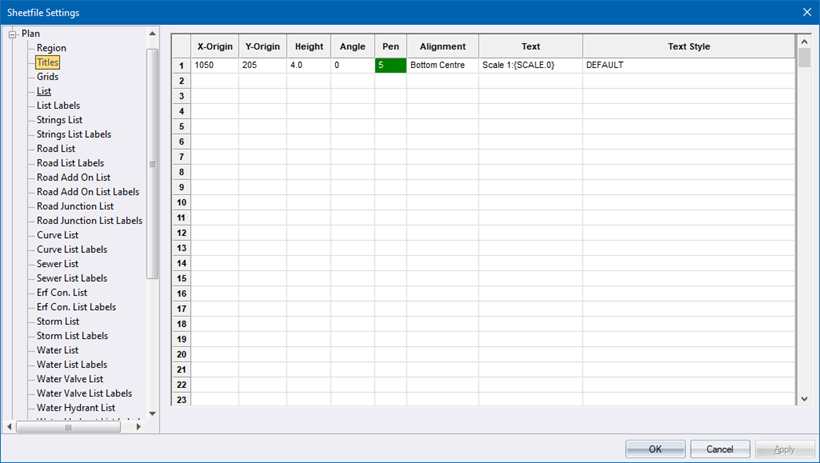
Specify the plan titles.
|
Option
|
Description |
|
X-Origin and Y-Origin |
Specify the point at which the text item must be placed. |
|
Height |
Specify the text height in mm. |
|
Angle |
Specify the angle at which the text should be rotated. An angle of 0 degrees draws text from left to right, and angles rotate anti-clockwise. |
|
Pen |
Select the pen in which to plot the text. Right-click the cell to display the pen selection. |
|
Alignment |
Select the text alignment relative to the X and Y origin of the text item. |
|
Text |
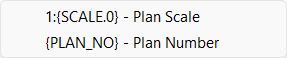
Enter the text to be drawn. There are some predefined variables that can be entered here. Right-click the cell to select a variable from the popup menu.
An explanation of the available variables is shown below. |
|
Text Style |
Select the text style from the list. Text styles are defined in the Text Style Editor. |
Available Variables
|
Variable
|
Description |
|
{SCALE.x} |
Plan scale – see note below. |
|
{PLAN_NO} |
The sheet number if multiple plans are generated during the Plot function.. |
The .x in the above variables can be substituted with a value that specifies the number of decimals to be displayed. For example, if the drawing scale is 1 : 1500 and the text item is specified as 1 : {SCALE.3}, the text drawn would be 1 : 1500.000.