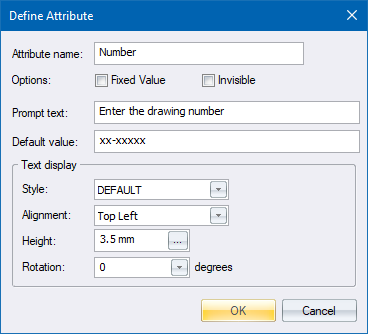
Specify the details of an Attribute entity that can be inserted directly into the drawing, or can be part of a block.
|
Option
|
Description |
|
Attribute name |
Specify a unique name for this attribute entity, also known as its ID or tag. |
|
Fixed Value |
Select this checkbox to have the attribute take the value specified as Default value. You will not be prompted to enter a value for this attribute when inserting a block containing this attribute into the drawing. |
|
Invisible |
Select this checkbox if the attribute should not be displayed. It will still exist in the drawing or in a block. |
|
Prompt text |
Enter the text to be displayed as a prompt when the attribute is created. This can be placed directly into the drawing or as part of a block. |
|
Default value |
Enter the default value, or the fixed value if that option is selected, that should be used when prompting for the value. |
|
Text display |
|
|
Style |
Select the text style to be used when displaying the attribute text. |
|
Alignment |
Select the alignment to be used when displaying the attribute text. |
|
Height |
Enter the height, in drawing units, to be used when displaying the attribute text. |
|
Rotation |
Enter the angle, in degrees, to be used when displaying the attribute text. |