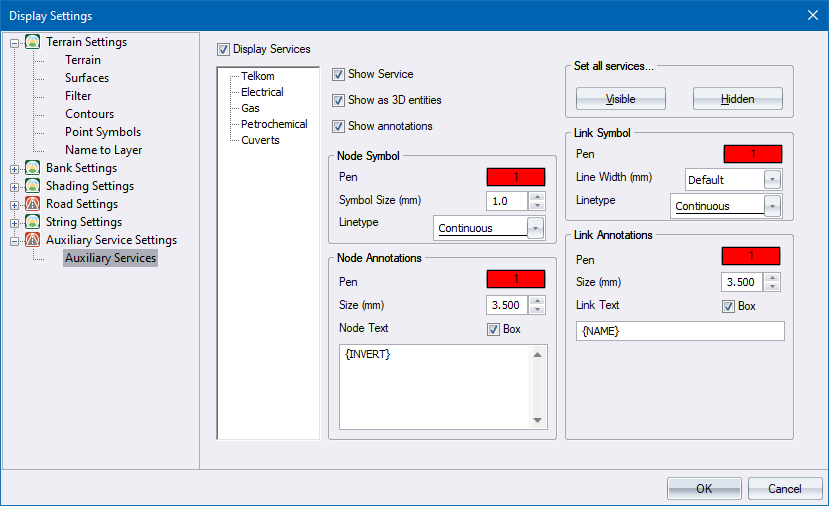
These settings allow you to specify the display parameters for each defined auxiliary service.
|
Option
|
Description |
|
Display Services |
Select this checkbox to display or hide all the auxiliary services. |
|
Select tree |
Select the auxiliary service to edit. |
|
Show Service |
Select this checkbox to display the selected service. Deselect to hide it. |
|
Show as 3D entities |
Select this checkbox to display the selected service as 3D solid entities. |
|
Show annotations |
Use this checkbox to enable/disable the drawing of node and link text for the selected service. |
|
Node Symbol |
|
|
Pen |
Specify the pen colour for service nodes. |
|
Symbol Size (mm) |
Enter the size (in mm on paper) for the nodes. Nodes will be displayed as circles. |
|
Linetype |
Specify the line style to be used when drawing the nodes. |
|
Node Annotations |
|
|
Pen |
Specify the pen colour for node annotations. |
|
Size (mm) |
Enter the text height (mm on paper) for the node annotations. |
|
Node Text |
Enter the text to be written as an annotation at each node. A number of variables are available. Right-click the relevant cell to select from a menu. |
|
Box |
Select this checkbox to display a box around the node annotation text. |
|
Link Symbol |
|
|
Pen |
Specify the pen colour for the service link. |
|
Line Width (mm) |
If the Show 3D Entities option is not selected, specify the size (in mm on paper) for the link line width. |
|
Linetype |
Specify the line style to be used when drawing the links. |
|
Link Annotations |
|
|
Pen |
Specify the pen colour for link annotations. |
|
Size (mm) |
Enter the text height (mm on paper) for the link annotations. |
|
Link Text |
Enter the text to be written as an annotation at each link. A number of variables are available. Right-click the relevant cell to select from a menu. |
|
Box |
Select this checkbox to display a box around the link annotation text. |
| Set all services | |
|
Visible |
Click to set all services in the project to be visible. |
|
Hidden |
Click to set all services in the project to be hidden. |