|
Option |
Description
|
|
Appearance |
|
|
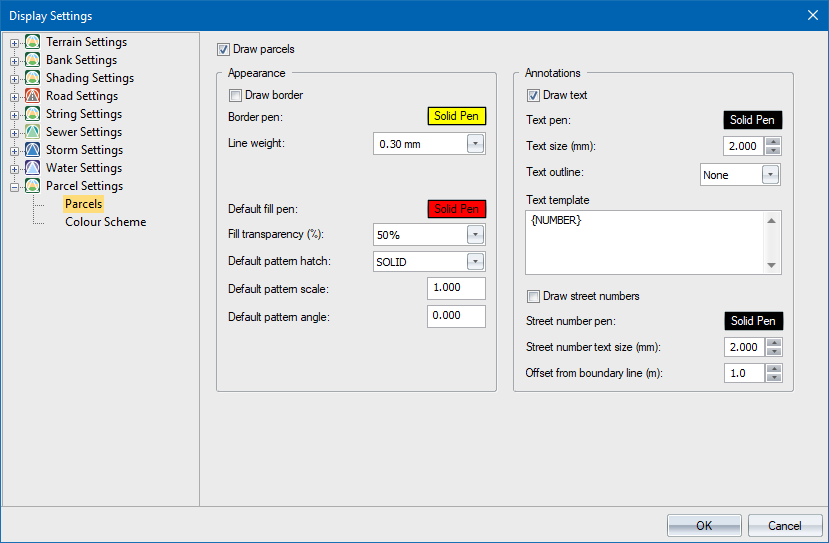
Draw parcels |
Select to enable the display of parcels. |
|
Border pen |
Set the pen colour of the parcel border. |
|
Line weight |
Set the line weight of the parcel border. |
|
Draw border |
Select to enable the display of borders around parcels. |
|
Default fill pen |
Fill colour to use when colour scheme is Default. |
|
Fill transparency |
Set the fill transparency. |
|
Default pattern hatch |
Pattern to use when colour scheme is Default |
|
Pattern pattern scale |
Hatch scale to use for pattern fill when Colour scheme is Default |
|
Default pattern angle |
Hatch angle to use for pattern fill when Colour scheme is Default |
|
Annotations |
|
|
Draw text |
Select to enable the display of text inside the parcel. |
|
Text pen |
Set the pen colour of the annotation text. |
|
Text size (mm) |
Set the text size of the annotation text. |
|
Text Outline |
Select whether the text should be outlined or not. You can opt to outline the text with a box or a circle. |
|
Text template |
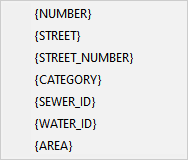
Enter the annotation text for each parcel. A number of variables are available:
|
|
Draw street numbers |
Select to enable the display of the parcel street number property. |
|
Street number pen |
Set the pen colour of the street number text. |
|
Street number text size (mm) |
Set the text size of the street number text. |
|
Offset from boundary line (m) |
Set the offset distance from the boundary to the street number text. |