|
Option
|
Description |
|
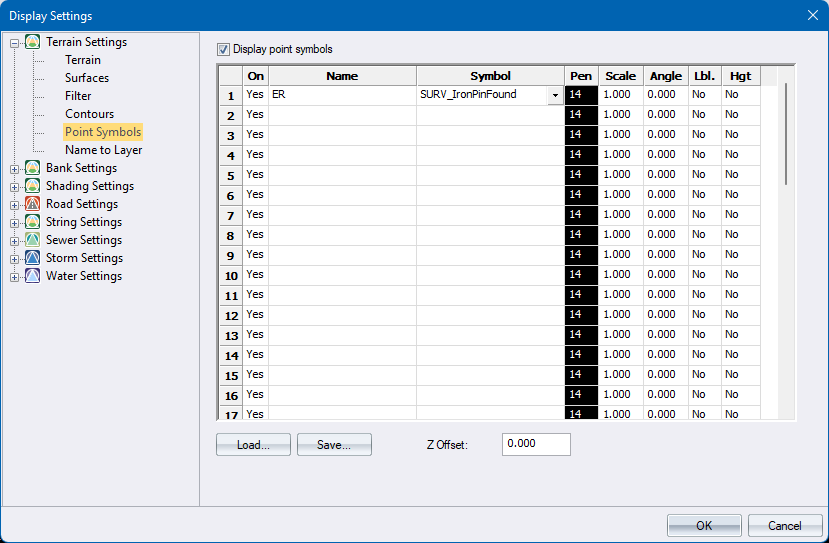
Display point symbols |
Select this checkbox to display point symbols. |
|
On column |
Enable or disabled the display of the symbol. Enter either Yes or No in the desired cell or right-click the cell to toggle the current entry. |
|
Name column |
Enter the point names to be displayed as symbols. This functions in the same way as a name filter entry in that the points whose names contain the entered text will be processed. |
|
Symbol column |
Right-click the cell and select the appropriate symbol from the dropdown list. Only those symbols that are contained in the drawing SurveySymbols.dr4, stored in the user directory, will be available. |
|
Pen Column |
Select the pen colour for this symbol. |
|
Scale column |
Enter the exaggeration factor for the symbol. The minimum factor that can be entered is 0.001. |
|
Angle column |
Enter the rotation angle in decimal degrees for the symbol. |
|
Lbl. column |
Set the display of labels on or off. Enter either Yes or No in the desired cell or right-click the cell to toggle the current entry. This label setting is independent of the normal Name display option. |
|
Hgt. column |
Set the display of heights on or off. Enter either Yes or No in the desired cell or right-click the cell to toggle the current entry. This height setting is independent of the normal Height display option. |
|
Load |
Press to load the symbols spreadsheet from a saved file |
|
Save |
Press to save the symbols spreadsheet to a file |
|
Z Offset |
Enter a height offset to make symbols more visible in Render View |