|
Option
|
Description |
|
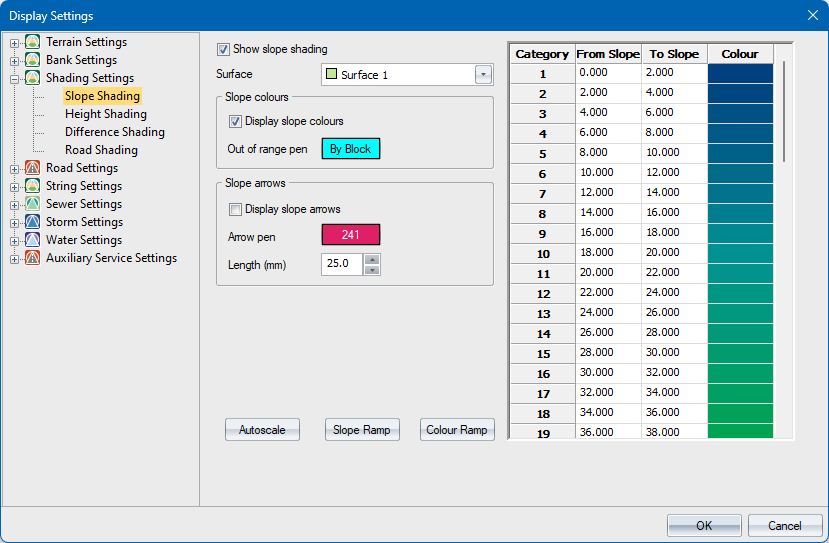
Show slope shading |
Select this checkbox to enable slope shading display. |
|
Surface |
Select the surface for which slope shading should be generated. |
|
Slope colours |
|
|
Display slope colours |
Select this checkbox to enable the colour display. |
|
Out of range pen Button |
Click this button to access the colour settings so you can specify a pen for shading items which do not fall into the specified ranges. |
|
Slope Arrows |
|
|
Display slope arrows |
Select this checkbox to display arrows in the direction of water flow across the model. |
|
Arrow pen |
Click this button to access the colour settings so you can specify a pen for the slope arrow. |
|
Arrow length |
Enter the length of the slope arrow head in mm on paper. |
|
Category List |
|
|
From Slope column |
Enter the minimum slope in percentage for this range. See the Slope Ramp settings for an explanation of percentage slopes. |
|
To Slope column |
Enter the maximum slope in percentage for this range. |
|
Colour column |
Right-click the cell to access the Windows colour settings so you can specify a colour with which to shade the range. |
|
Autoscale button |
Click to calculate the range of slopes and autoscale the Category list settings. |
|
Slope Ramp button |
Click to access the Slope Ramp window in order to specify a ramp to be applied to all ranges. |
|
Colour Ramp button |
Click to access the Colour Ramp window in order to specify a ramp to be applied to all ranges. |