|
Option
|
Description |
|
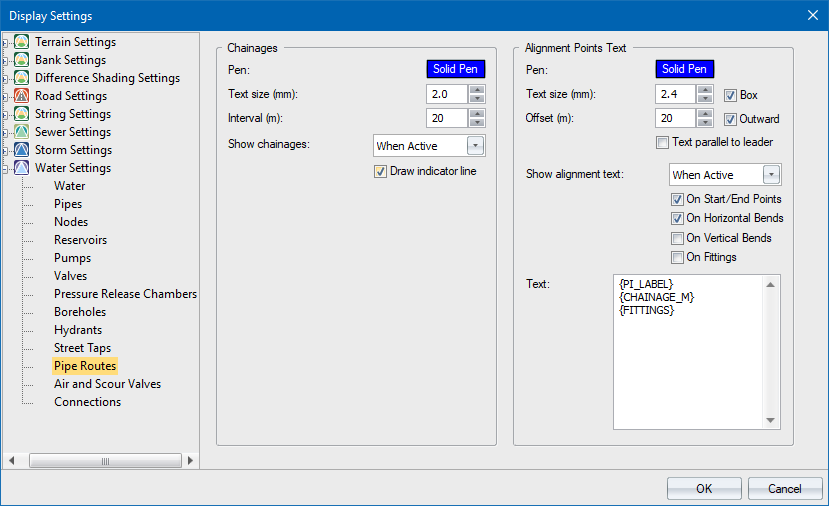
Chainages |
|
|
Pen |
Select pen for chainage text. |
|
Text Size (mm) |
Chainage text size in mm on paper. |
|
Interval (m) |
Enter interval for chainage display. |
|
Show |
Select when chainages will be shown:
|
|
Draw indicator line |
Select this checkbox to underline chainage text on the exact chainage positions. |
|
Alignment Points Text |
|
|
Pen |
Select pen for alignment points text. |
|
Text Size (mm) |
Alignment points text size in mm on paper. |
|
Box |
Select this checkbox to draw a box around alignment points text. |
|
Offset |
Distance from the alignment point to the text. |
|
Outward |
By default, alignment point text is displayed on the outward side of the bend. Deselect this checkbox to display text on the inward side. |
|
Text parallel to leader |
|
|
Show Alignment Text |
Select when alignment points text will be shown:
|
|
On Start/End Points |
Select this checkbox to show text next to start and end of the route. |
|
On Horizontal Bends |
Select this checkbox to show text next to horizontal bends. |
|
On Vertical Bends |
Select this checkbox to show text next to vertical bends. |
|
On Fittings |
Select this checkbox to show text whenever an alignment point has associated fittings. |
|
Text |
Template for text generation. Recognised keywords are:
|