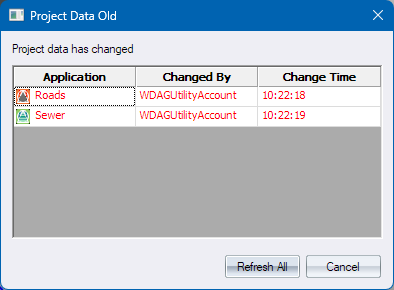
|
Option
|
Description |
| Spreadsheet |
One status row for each Read Only project file that has changed on disk. |
|
Application |
The name of the owning module. Hover over the cell for the actual filename. |
|
Changed By |
This is the Windows username of the user who has saved the file and therefore prompted the notification that the file has changed. |
|
Changed Time |
This is the time on the computer when the file was changed. |
| Refresh All |
Press to have the changed data refreshed. The module data will be closed and reopened, remaining as read-only. This will be enabled if you arrive here from clicking on the red “Data Old” status bar button. This will be disabled if you arrived here from clicking on the Windows taskbar balloon notification window as this may be an unsafe time depending on what you’re busy with. |
| Cancel |
Pressing this will leave the read-only data as out of date, allowing you to return by clicking on the red “Data Old” status bar button when it more suits you. |