K Value
Calculate curve length by K value.
|
Icon |
Command |
Shortcut Key |
Toolbar |
|
|
RD_VERKVALUE |
|
|
This function allows you to enter a specific K value for a certain VPI. The function then calculates the curve length to achieve this K value, and prints it to the screen or the printer depending on the option chosen.
This curve length, or a rounded equivalent thereof, can then be entered into the alignment. This is not done automatically.
K Value
The K-value is the horizontal distance required to achieve a 1% change in the slope of the vertical curve.
For Symmetrical Vertical Curves

Where:
L = length of curve
A = absolute value of difference in grades
For Asymmetrical Vertical Curves
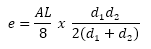


K = the lesser of K1 and K2
Where:
d1 = distance from BVC to PI
d2 = distance from PI to EVC
so, L = d1 + d2
Procedure
-
You will be prompted to “Indicate curve to set k-value for”. Graphically indicate the vertical curve that you would like to alter.
- The K Curve Details display.
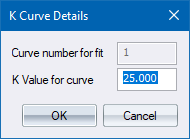
-
Fill in the desired K value and click OK to continue.
- The following displays in the Output Bar.

-
The selected vertical curve length will be altered accordingly.