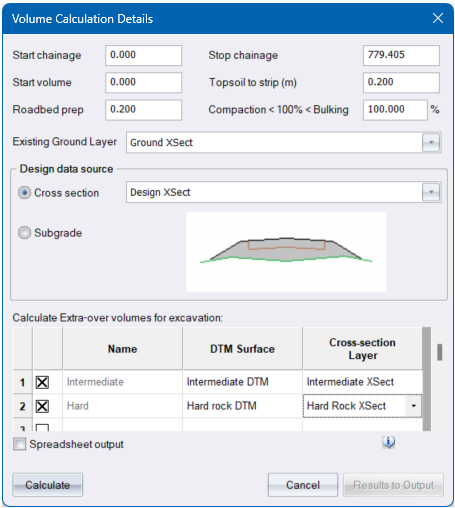
Specify the parameters for the volume calculations.
|
Option
|
Description |
|
Start chainage |
Enter the first chainage of the range of chainages for which volumes should be calculated. |
|
Stop chainage |
Enter the last chainage of the range of chainages for which volumes should be calculated. |
|
Start volume |
Enter the volume that should be added to the overall run to accommodate arbitary items such as borrow material, bellmouths, culverts, etc. |
|
Roadbed prep |
Enter the depth of the roadbed prep. (The natural in situ material on which the fill or any layers are to be constructed.) |
|
Topsoil to strip (m) |
Enter the depth of topsoil that should be stripped from cross-sections before volumes are calculated. |
|
Compaction < 100% < Bulking |
Enter the bulking or compaction factor that should be applied to calculated cut volumes. Factors of over 100 imply bulking while factors under 100 imply compaction. A value of 100 will ignore any form of bulking or compaction. |
|
Existing Ground Layer |
Select the existing ground layer for volume calculations. |
| Design data source | |
| Cross-Section | Select the batter layer for which volumes should be calculated. |
| Subgrade | Select this checkbox if you want the volume to be between the existing ground and the subgrade layer - below the template defined layerworks. |
|
Spreadsheet output |
Select this checkbox to have the results of this function written out in comma-delimited format suitable for importing into a spreadsheet. |
|
Calculate button |
Calculate the volumes. This allows you to set different topsoil stripping and compaction/bulking factors before printing the results. |
|
Results to Output button |
Click to print the final result of the volume calculation. This button is activated after volumes for the first defined range have been calculated. |
|
Calculate an Extra-over excavation volume for each row of the spreadsheet. Note that you have to specify the items in depth order, so the shallowest excavation should be in the first row and the deepest excavation in the last row. These are the project-wide extra-over settings, which have been specified during cross section extraction ( Extract ), but can be edited in this dialog. |
|
|
Name |
Name of the extra-over quantity. The first two quantities (Intermediate and Hard) cannot be renamed. |
|
DTM Surface |
Specify the DTM surface which will be used to calculate extra-over excavation quantities for junction. |
|
Cross-section Layer |
Specify the Cross-section Layer that will be used to calculate extra-over excavation quantities for the road, using the end-area method |
|
Spreadsheet Output |
Check this option to calculate the extra over quantities excavation for each row |
See Volume calculations for an explanation of the output.
See Also Masshaul Volumes, Cumulative Volumes