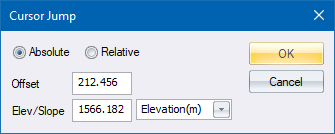
Move the road window cursor to a specific position.
Press Enter to accept the input rather than clicking OK. If you move the mouse after clicking OK, the cursor is moved away from the entered position.
|
Option
|
Description |
|
Absolute |
Select this option to set the cursor position at the values entered into the Offset and Elev/Slope edit boxes. |
|
Relative |
Select this option to shift the current cursor position by the values entered into the Offset and Elev/Slope edit boxes. |
|
Offset |
Enter the chainage (when in Vertical Edit or Edit Alignment), or offset (when in Section Graphical Edit). |
|
Elev/Slope |
Enter the elevation, if the list box option is set to "Elevation (m)":
Enter the relative slope, from the original cursor position, in % if the list box option is set to Slope (%)
|


See Also Vertical Alignment, Edit Pipe Alignment, Graphical Edit