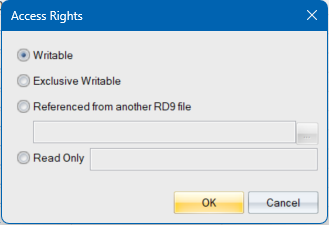
Use this dialog to allocate names to road layers.
|
Option |
Description |
|
Writable |
Select this option to have full access to the road file. You can make changes to the roads data.. |
|
Exclusive Writable |
Select this option to have full access to the road file. You can make changes to the roads data. If the RD9 file, is opened by any other user with a different computer name, the road will be Read Only. |
|
Referenced from another RD9 file |
Select this option to reference the road from a different RD9 file. Civil Designer will load the roads data from a specified RD9 file and treat it as Read Only. You will get a notification when the referenced roads file has changed and be presented with the opportunity to refresh the data. Or press the [Screen Layout button at the bottom of the screen |
|
Read Only |
Select this option to use the roads data as Read Only. You will not be allowed to change the roads data. But you will be allowed to change the Display Settings for the road and interrogate the roads model.. |
|
OK Button |
Click to accept the changes. |
|
Cancel Button |
Click to cancel the changes |