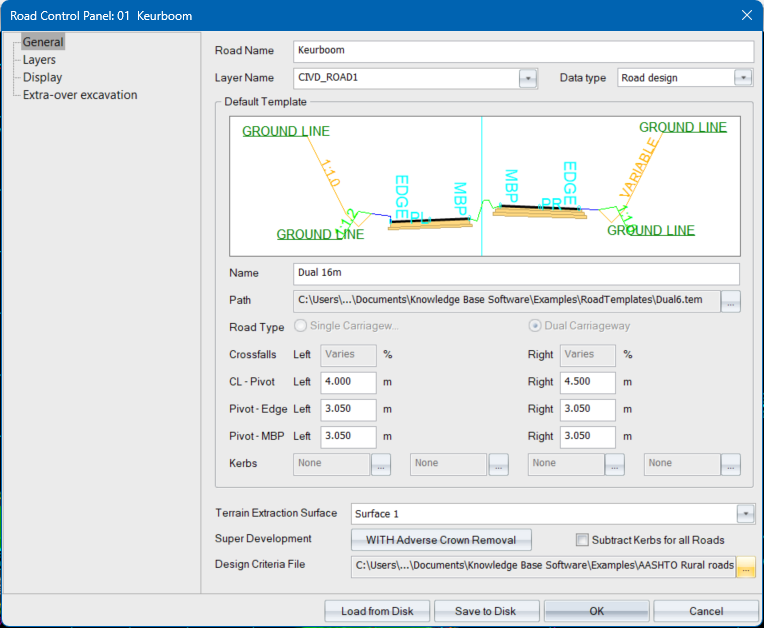
The Road Control Panel allows you to easily specify the essential data when creating a new road. It is accessible from the Select Road File function, the Tools menu, and the right-click context menu in Roads Design mode.
|
Option
|
Description |
|
Road Name |
Specify a name for the active road. |
|
Layer Name |
Select a drawing layer for the road layout to be displayed in. |
|
Data Type |
Specify the type of Road Strings data that will be stored in the selected road. |
|
Default Template |
|
|
Name |
Specify the name of the road template for this road. |
|
Path |
This box shows the path to the road template file. Click ... to select a template using the file browser. |
|
Road Type |
The road type is read from the template file and displayed. |
|
Crossfalls |
Specify the left and right carriageway crossfalls. These may be changed using the Edge Level Editor.
|
|
Widths |
Specify the left and right carriageway widths. These may be changed using the Edge Level Editor.
Single Carriageway only. |
|
CL - Pivot |
Specify the distance between the centreline and the pivot point for the left and right carriageways. These may be changed using the Edge Level Editor.
Dual Carriageway only. |
|
Pivot - Edge |
Specify the distance between the pivot point and the outside edge of the left and right carriageways. These may be changed using the Edge Level Editor.
Dual Carriageway only. |
|
Pivot - MBP |
Specify the distance between the pivot point and the median break point (MBP) for the left and right carriageways. These may be changed using the Edge Level Editor.
Dual Carriageway only. |
|
Kerbs |
Specify the kerbs for the left and right edges of the carriageway(s). Click on the [...] button to display the Kerb Selector. Single Carriageway:
Dual Carriageway:
|
|
Select which DTM surface must be used to extract natural ground levels for the cross-sections. |
|
|
Super Development |
Select the super elevation development method. |
|
Subtract Kerbs |
Select this checkbox to subtract kerbs from the generated design cross-sections. |
|
Design Criteria File |
Specify a design criteria file.
|
|
Load from Disk |
Click to load an existing road profile from disk. |
|
Save to Disk |
Click to save the current road settings as a road profile. |






