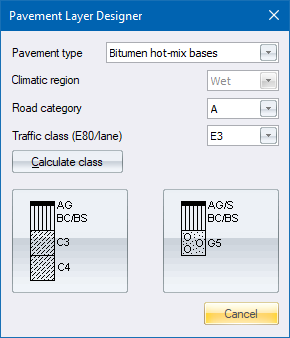
The appearance of the large buttons is dependant on the preceding selections. Some combinations of selections have no layer definitions; some have only one, in which case the left button will be visible; and some have two, in which case both buttons will be visible.
|
Option
|
Description |
|
Pavement type |
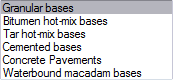
Select the type of pavement from the list.
|
|
Climatic region |
Select the climatic region. Only applicable to Granular base pavements.
|
|
Road category |
Select the road category.
|
|
Traffic class |
Select the required traffic class.
|
|
Calculate class Button |
Click to display the Cumulative E80 Calculator. |
|
Left layer definition button |
Click to select the layer definition that will update the template accordingly. |
|
Right layer definition button |
Click to select the layer definition that will update the template accordingly. |
|
Cancel button |
Click to cancel the function. |


See Also Template Editor