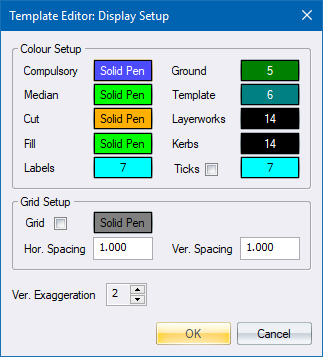
Specify the colours, grid spacing and vertical exaggeration factor for the Road Template Editor.
|
Option
|
Description |
|
Colour Setup |
|
|
Compulsory |
Select the pen (colour) for the compulsory additions. |
|
Median |
Select the pen (colour) for the median (dual carriageway only). |
|
Cut |
Select the pen (colour) for the cut slope. |
|
Fill |
Select the pen (colour) for the fill slope. |
|
Labels |
Select the pen (colour) for the key point labels (SBP, MBP, etc). |
|
Ground |
Select the pen (colour) for the ground line. |
|
Template |
Select the pen (colour) for the template when the Add Ground option is active. |
|
Layerworks |
Select the pen (colour) for the layerworks. |
|
Kerbs |
Select the pen (colour) for the kerbs. |
|
Tick |
Check this option to display tick marks between the various parts of the template and select the pen for them. |
|
Grid Setup |
|
|
Grid |
Select this checkbox to display a grid. |
|
Grid Pen |
Select the pen (colour) for the grid lines. |
|
Hor spacing |
Specify the horizontal grid spacing. |
|
Ver spacing |
Specify the vertical grid spacing. |
|
Ver Exaggeration |
Specify the vertical exaggeration, i.e. the vertical:horizontal scale ratio. |