Basic Concepts
Applications for the Road Design module are by no means confined to roads alone. Its functions deal with any form of terrain in sectional form, such as pipelines, canals, reservoirs, railways, airports, river channels, dams, dumps and bulk earthworks.
Up to 2500 roads can be attached to any one job.
-
Strings Modelling method - Roads in Civil Designer will be modelled as Strings, a series of 3D polylines that run along the length of the road. Design Cross-sections will then be extracted from the Strings model for volume calculations and construction drawing generation.
-
Legacy Cross-sections modelling method - The road will be modelled by cross sections at regular intervals. This is traditional method used by older versions of Civil Designer.
To facilitate the wide variety of applications, you can specify the type of data that will be stored in each road. The Data Type can be set to "Roads Design", "Earthworks only" or "Pipe Long Section"
Data Types
-
Roads Design: When this data type is selected, the road will be modelled as Strings and design cross sections will automatically be extracted from the Strings model and stored in the road’s design cross-section layer (Batter Layer) as needed. For this data type, the Interactive Road Expert can be used to automatically finish all the calculations after alignment changes.
-
Pipe Long-section: This data type should be used exclusively with the Pipe Alignment functionality in Civil Designer Roads module.
-
Earthworks only: The purpose of this data type is to allow you to store Cross-section data in any cross-section layer for any purpose, such as volume calculations between any 2 layers, cross-section comparisons or cross-section drawing production. A strings model will NOT be calculated.
Strings Modelling Method
The road strings method allows you to:
-
Design Intersections and Junctions.
-
Design Mini-roundabouts.
-
Design Stockdale Roundabouts.
-
Design Cul-de-sacs.
-
Dynamically view close-space contours on the road design.
-
Shade the road profile in plan.
- View a 3D rendered image of your road design, using the CAD’s Render View functions.
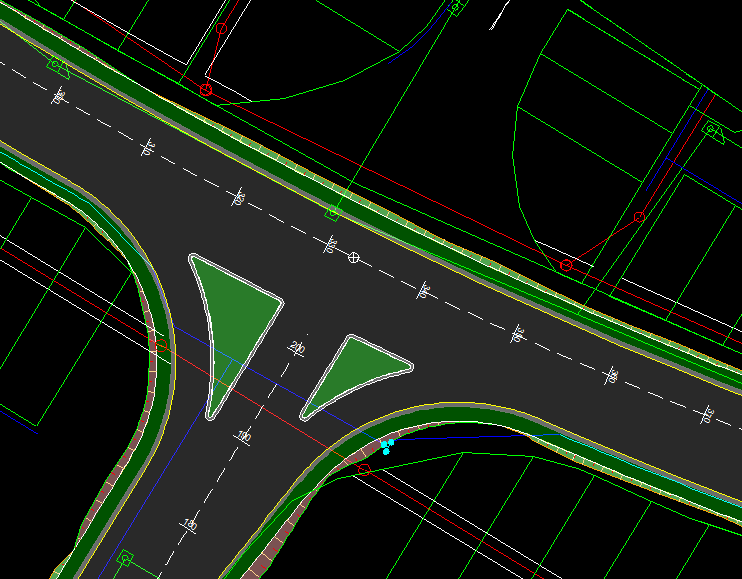
The advantage of road strings is that they can model complicated road edges, intersections, traffic circles and cul-de-sacs far more accurately and easily than the cross-section method. It is also far easier to view close-space contours (less than 0.2m interval) of the road surface. Even 3D views of the road and intersections are simplified.
Please refer to these Help topics for an overview of Road Strings
-
Recalculate function
-
Junction design (intersections, mini-roundabouts, cul-de-sacs)
Cross-Section Modelling Method
This method models roads by Cross-section data only. All new roads created in Civil Designer 9.1 and later, will be modelled with Strings as opposed to cross-sections. Please note that roads that have been created using the Cross-Section method in earlier versions of Civil Designer, can still be used in Civil Designer 9.1 but will be automatically changed to Strings when recalculated.
Cross-Section Data
Cross-sections are taken normal to an alignment of some description. The plan position of each section is defined by its 'chainage' or "station", which has a section offset of 0.000. The stations can be at regular or irregular intervals.
At each chainage, offset and elevation pairs defining various different layers can be stored. For example, a typical definition in a construction situation might be Original Ground, Final Design, This Month and Last Month. End areas and volumes can be extracted between any two of these layers.
Again, the extreme flexibility of the software must be emphasized. There are no effective restrictions as to the number of points on a cross-section, the number of chainages on a job, or the number of layers at any chainage. The number of layers at any chainage does not have to be pre-declared, nor does it have to remain constant. As you add more information, it is simply accumulated. Some, or all, of the data from one layer can be transferred to another. For instance, this Month can be moved into Last Month. Nothing has to be collected or calculated in sequence, which means a road can be built up in stages.
The ultimate objective of an earthwork program is to provide a quantity of cut, fill, topsoil, grassing areas, and so on. However, this only relates to the design phase. It is still necessary to produce a bill of materials, working drawings that specify how the job is to be built, and then control the actual process of construction itself.
The Construction functions are dedicated to assisting those users who need to interact with Civil Designer in a construction environment. This includes facilities to obtain setting out information, like batter boards and layer work pole details, as well as monitoring earthwork build up. The latter is particularly important. As well as yielding over or under cut and fill data, a full statistical analysis can be obtained on the construction of multiple layers. This function is most frequently used in conjunction with spirit levelled sections.
Bearing in mind that it is beyond the scope of this software to fully cover construction requirements, the purpose of the program is to assist towards the ultimate goal as far as possible. In principle, any item of information that is stored in Civil Designer or derivable from it, must be readily available to the user in the most effective form.