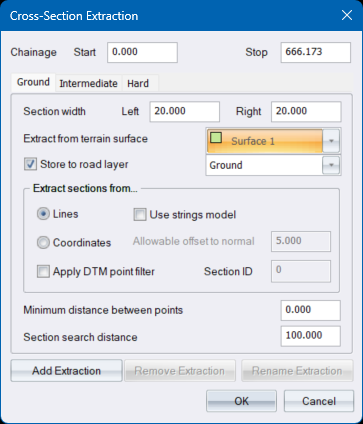
Specify the parameters to extract cross-sections from the terrain model. Select the “Intermediate” or “Hard” tabs to specify the extraction settings for cross sections that can be used for the calculation of extra-over excavation quantities ( Volume Calculations ). These cross sections will be extracted simultaneously..
|
Option
|
Description |
|
Chainage - Start and Stop |
Enter the first and last chainages of the portion of the horizontal alignment to process. |
|
Section width - Left and Right |
Enter the distances left and right of the centreline over which to extract the cross-section. |
|
Extract from terrain surface |
Select the surface that contains the points/line model from which to extract sections. |
|
Store to road layer |
Select this checkbox and select the road layer in which the extracted cross-section must be stored. If this option is not selected, the extracted data is only listed for information purposes. |
|
Extract sections from |
|
|
Lines |
Select this option to extract sections from line model intersections. |
|
Use strings model |
When this option is checked, the cross-section will include any crossings with terrain and road strings encountered. |
|
Coordinates |
Select this option to extract sections directly from points along the cross-section. |
|
Allowable offset to normal |
Only available if the Coordinates option has been selected in Extract sections from... Enter the distance around the normal to the centreline that will be considered when searching for a point to use in the cross-section, in order to accommodate points that might not be exactly on the normal to the centreline. |
|
Apply DTM point filter |
Select this checkbox to display the Point Filter and to only extract cross-section points from filtered points. |
|
|
|
|
Minimum distance between points |
Enter a minimum distance to be used to thin out points along the cross-section. |
|
Section search distance |
Enter the maximum distance away from the centreline that will be searched for cross-section line crossings or points. Note that the actual maximum search distance will be the greater of this distance and the specified left and right section widths with a minimum distance of 100m. |
|
Add Extraction |
Press this button to add more cross section extractions (in addition to Intermediate and Hard). |
|
Remove Extractions |
Press this button to remove cross section extractions. This option is disabled for Intermediate and Hard extractions. |
|
Rename Extractions |
Press this button to change the name of the currently selected extraction. This option is disabled for the Intermediate and Hard extractions. |
See Also Cross-Sections, Road Rehabilitation