|
Option
|
Description |
|
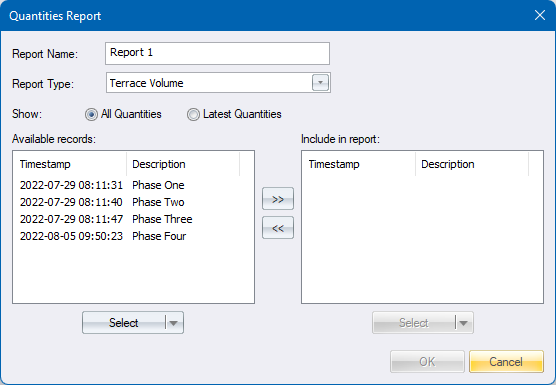
Report Name |
Enter the name of the report |
|
Report Type |
Select the type of quantities to total |
|
Show All Quantities |
The lists below will show all available quantities |
|
Show Latest Quantities |
The lists below will show only the latest quantities per description |
|
Available records |
Quantities here are available to be reported on, but yet to be moved to the right-hand side |
|
Include in report |
Only quantities moved here from the left-hand side will be included in the report |
|
>> << buttons |
Press to move selected entries to the left-hand or right-hand side respectively. |
|
Select buttons |
Press for different ways to select entries in the above lists. Different ways are:
|
|
OK button |
Disabled until a selection in the right-hand side list has been made. Press to accept the details to add or edit the report |
|
Cancel button |
Press to discard the changes and return. |