|
Option
|
Description |
|
Plot Setup |
|
|
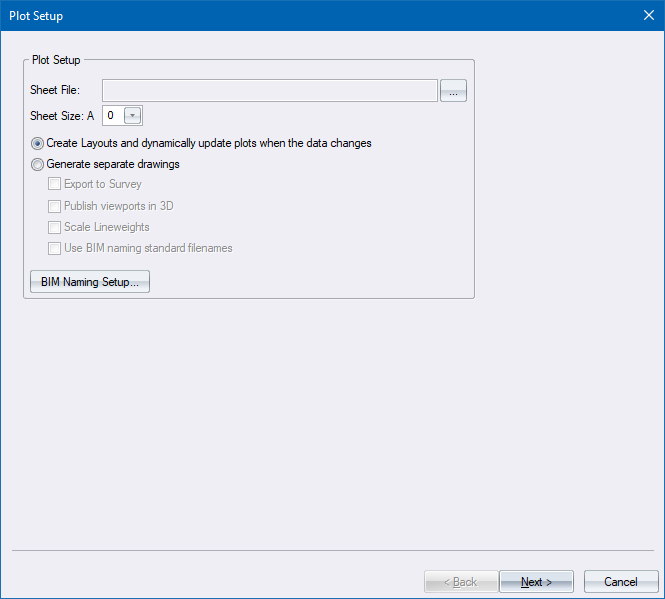
Sheet File |
Displays the name of the selected sheet file. |
|
Ellipsis button (...) |
Click to browse for a sheet file. |
|
Sheet Size |
Select the size of the paper sheet to be created for each layout plot. The selected sheet file will be scaled to this size. |
|
Create Layouts and dynamically update plots when the data changes |
Select this option to create one or more layouts that will automatically be updated if the drawing or design changes. |
|
Generate separate drawings |
Select this option to output (publish) the generated layouts as individual drawings. |
|
Export to Survey |
Select this checkbox to create the drawing in survey coordinates, otherwise they will be created in Cartesian coordinates (paper space). |
|
Publish viewports in 3D |
Select this checkbox to create the individual drawings with 3D coordinates. If this checkbox is not selected, the drawing will be created in 2D, i.e. the Z coordinates will all be set to 0.0. |
|
Scale Lineweights |
This option is only enabled when the Generate separate drawing option is selected, as it only applies when the plot generate output is a DR4 drawing.
|
|
Use BIM naming standard filenames |
Select this option to use Excel template-based ISO-19650-2 BIM file naming.. |
|
BIM Naming Setup button |
Click to open the BIM Naming Setup dialog which will allow you to configure the BIM Naming template and enter/change the values you want to appear in the published output for the required BIM naming fields (eg: Level, Zone, Starting Document Number and Revision).. |
 If you need to scale lineweights in an existing drawing, you can use the script