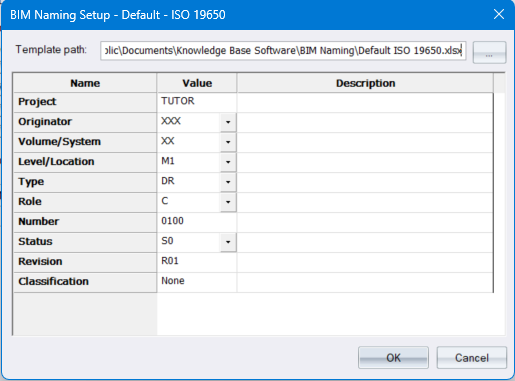
Set or change the values you want to use for the Excel template-based ISO 19650-2 BIM file naming fields.
These are the values that will be used when saving a new drawing with the “System Settings -> Drawing Loading / Saving -> Create BIM standard filename for new drawings” option enabled.
When Plot Generating to separate drawings, these values will also be used in the published drawings' filenames if you have enabled the Use BIM naming standard filenames option in the parent Plot Setup dialog. The first published layout’s filename will use the value in the Number field, and this number will be incremented for subsequent published layouts.
If the sheetfile used contains global titles or plan titles with “BIM variable text” (ie: “{BIM_XXXX}”), then plot generate will replace these variables with the field values you specify in this dialog. For example: “{BIM_REVISION}” will be replaced by the “R01” value entered in the “Revision” field in the dialog above.
The “Number” field is incremented for each layout generated.
A special sheetfile global text “BIM variable” is “{BIM_FILE_NAME}”, which will be replaced by the name of the file generated using the BIM fields.
These values will also be used in the published drawings' filenames if you have enabled the Use BIM naming standard filenames option in the parent Plot Setup dialog.
|
Option |
Description
|
|
Template path |
The path and filename of the Excel template used for the ISO 19650-2 BIM file naming. The supplied templates are in the C:\Users\Public\Documents\Knowledge Base Software\BIM Naming folder. However each BIM project would have its own template specified. |
|
Name column (not editable) |
The name of each field specified in the Excel template |
|
Value column |
The user-entered value for each of these fields. The template defines whether these are text entry fields, or drop-down lists. In the case of drop-down lists, the template defines which values are allowed/selectable. The template also defines the minimum and maximum allowed character length of each of the values. |
|
Description column (not editable) |
Optionally, a helpful description for the field may or may not be included in the template. |