|
Option
|
Description |
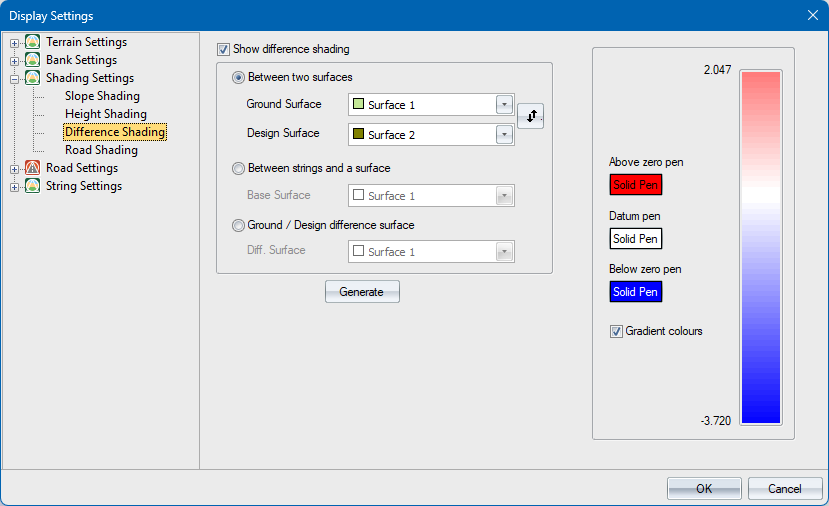
| Show difference shading | Select this checkbox to enable cut and fill shading display. |
| Between two surfaces | |
|
Ground Surface |
Select the first of two surfaces to compare. Triangles of this surface won't be shaded but will be used for interpolating the height difference. |
|
Design Surface |
Select the second of two surfaces to compare. Triangles of this surface will be shaded with respect to the triangles of Surface 2. |
|
Swap button |
Click to swap the above surface selections around. |
|
Between strings and a surface |
|
|
Base Surface |
Select the surface to use as the base for shading triangles of road strings and terrain strings. |
|
Ground/Design difference surface |
|
|
Diff Surface |
Select the surface for which shading should be displayed. You would typically use the surface generated by the Difference Surface function. |
|
Generate |
Click to automatically set the colour ramp for the maximum height difference range based on the selected option. |
| Colour ramp | The colours are dynamically set by clicking the Generate button. |
| Below zero pen | Click to specify a pen for shading areas that fall below zero. |
| Datum pen | Click to specify a pen for shading areas that have a zero height difference. |
| Above range pen | Click to specify a pen for shading areas that fall above zero. |
| Gradient colours | If this option is selected, the colour ramp changes according to the magnitude of the height difference. If this option is not selected, a single absolute colour is used for all ranges above zero, and a single absolute colour is used for all ranges below zero. |