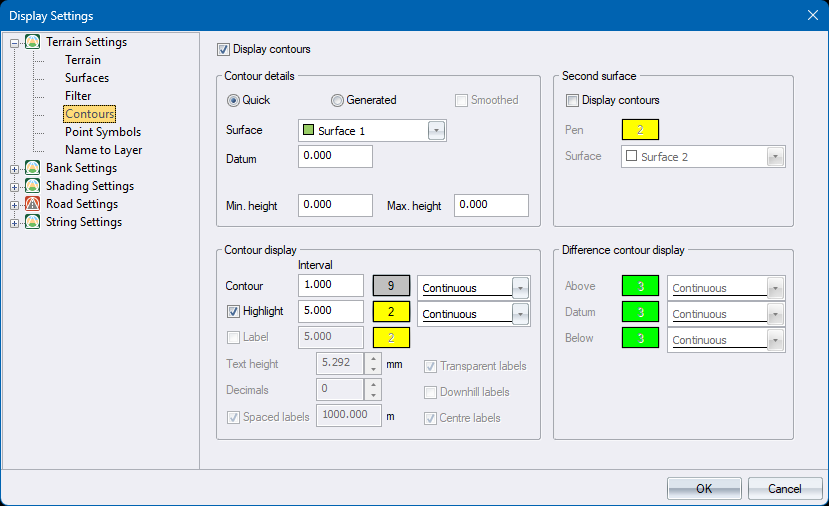
Notes
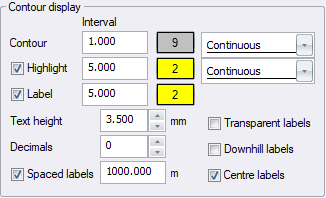
- Label settings are only enabled for generated contours, and not for quick contours.
-
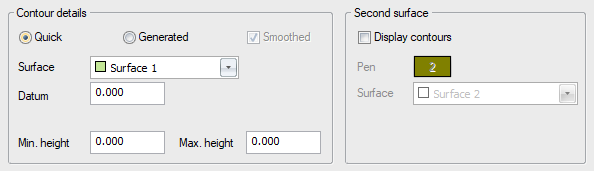
Second surface settings are enabled only for quick contours, and not for generated contours.
-
Different contour display settings are enabled only for generated grid contours, when DTM Contours has been performed on a DTM grid generated with the Ground/Design Difference option.
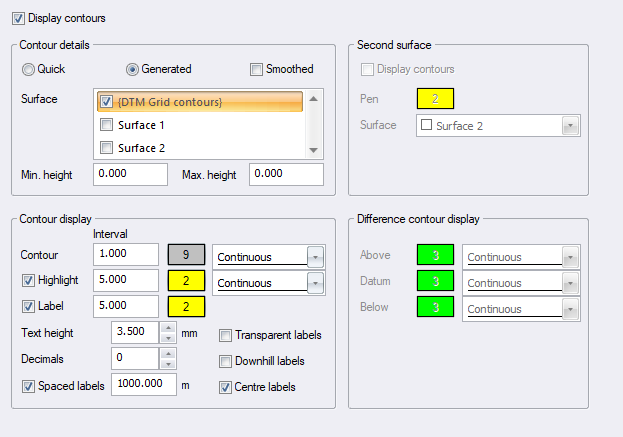
See Contours from Lines versus from DTM for more information on the differences between the two types.
|
Option
|
Description |
|
Display contours |
Select this checkbox to enable contour display. |
|
Contour details |
|
|
Quick or Generated |
Select either the Quick option to display contours from polygons, or the Generated option to display contours as generated by the Contours from Lines or DTM Contour functions. |
|
Select the surface for which contours must be displayed. For generated contours, the list will contain only the surfaces that have had Contours from Lines already performed on it. |
|
|
Smoothed
|
If you have selected the Generated option you can also select to have the contours smoothed. This will apply a Bezier curve to the contour. This smoothing can, however, sometimes introduce anomalies such as contours crossing each other. Use with caution. It is also far slower than displaying un-smoothed contours. |
|
Datum |
Enter the rounding factor for contour elevations. Contours that are a multiple of this value will be displayed. Only available if the Quick option is selected. |
|
Min. Height |
Enter the minimum height for the displayed contours. A value of 0 implies no minimum. Only available if the Generated option is selected. |
|
Max. Height |
Enter the maximum height for the displayed contours. A value of 0 implies no maximum. Only available if the Generated option is selected. |
|
Contour display |
|
|
Contour Interval, Pen and Linetype |
Enter the height interval at which to display contours, the pen to be used to draw the contour lines, and the line type in which to draw the contours. |
|
Highlight, Interval, Pen and Linetype |
Select this checkbox to display highlighted contours. Enter the height interval at which to display highlighted contours, the pen to be used to draw the highlighted contours, and the line type in which to draw the highlighted contours. |
|
Label, Interval and Pen |
Select this checkbox to label contours. Enter the height interval at which to display labels, and the pen to be used to label the contours. Only applicable to Generated contours. |
|
Transparent labels |
Select this checkbox to have the label text superimposed on the contour |
|
Txt hgt |
Enter the height of contour labels in mm. Only applicable to Generated contours. |
|
Decimals |
Enter the number of decimal places for contour labels. Only applicable to Generated contours. |
|
Spaced labels |
Check to have labels automatically generated. Specify the interval, in metres, along the contour line at which contour labels should be displayed. Only applicable to Generated contours. To turn off interval labelling along contour lines and only have them at the contour line ends, set the spacing to 0. Uncheck to have no labels automatically generated, instead to only display Add Label Line.. |
|
Downhill labels |
Select this checkbox to have contour labels generated such that the labels are oriented to be read when facing downhill. Normally contour labels are oriented to be read when facing uphill. |
|
Centre labels |
It can happen that contour lines are made up of concatenated parts such that the label spacing is inadequate for these smaller lengths and labels then too sparse. This option will force a label halfway along the concatenated parts. |
|
Second surface |
|
|
Display contours |
Select this checkbox to have contours displayed for an additional surface. Only available for Quick contours. |
|
Pen |
Click this button to select the colour in which these contours should be displayed. Only available for Quick contours. |
|
Surface |
Select the surface for which the second set of contours must be displayed. Only available for Quick contours. |
|
Difference contour display |
|
|
Above Pen and Linetype |
Select the Pen and Linetype in which to display difference contours above the datum contour. Only applicable when Generated is selected and the stored contour file was created from a grid generated by the DTM Ground/Design Difference function. |
|
Datum Pen and Linetype |
Select the Pen and Linetype in which to display the datum contour. Only applicable when Generated is selected and the stored contour file was created from a grid generated by the DTM Ground/Design Difference function. |
|
Below Pen and Linetype |
Select the Pen and Linetype in which to display difference contours below the datum contour. Only applicable when Generated is selected and the stored contour file was created from a grid generated by the DTM Ground/Design Difference function. |