Add Label Line
|
Icon |
Command |
Shortcut Key |
Toolbar |
|
|
TERRAINCONTOURLABELLINE |
|
|
This function is applicable to Generated Contours, not Quick Contours, and allows you to define contour labels along a line between two indicated points. Labels are then drawn where the line intersects with contours, subject to the display settings for contour labels. These labels are displayed in addition to the labels that are automatically drawn at a spacing interval along contours. However those automatic labels can be switched off in the display settings. The user defined labels remain in place between subsequent regenerations of contours for that surface. The line of labels can be removed with the corresponding Remove Label Line function.
Procedure
- A dialog to select a single surface is displayed..
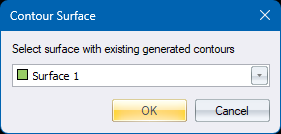
The list of surfaces contains only those surfaces for which contours have been generated. You first need to Generate Contours before the surface is listed. Make your selection and press OK.
-
You are prompted:
Indicate the start point of the contour label line
Indicate a position for the start of the label line
-
You are prompted:
Indicate the end point of the contour label line
Indicate a position for the end of the label line
-
Labels are then drawn where this line intersects contours, subject to the display settings contour label interval settings.
-
You remain in the function and are continued to be prompted for end points of subsequent chained label lines.
-
To start a new label line at a different position, you can right-click and choose Cancel from the context menu to start again.
-
To stop, press <Esc> or right-click Quit from the context menu.