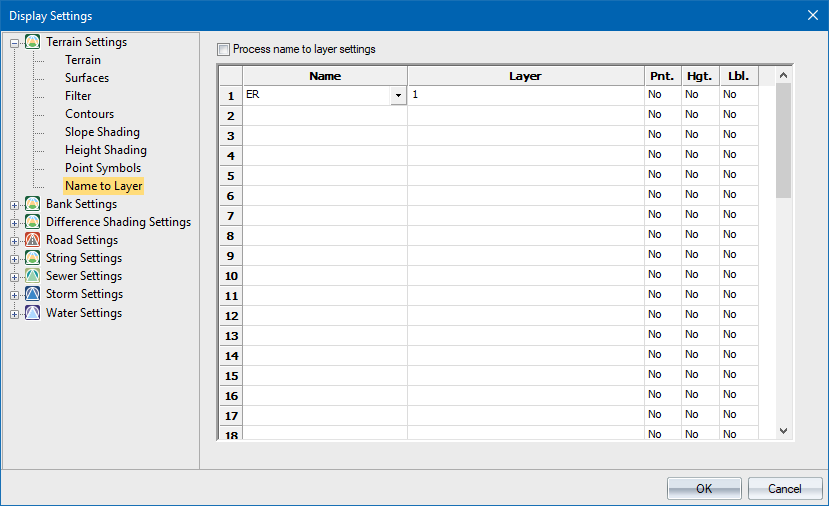
Option
|
Description |
Process name to layer settings |
Select this checkbox to enable processing of this name list during Publish Layout. |
Name column |
Enter the point names to be processed. This functions in the same way as a name filter entry in that the points whose names match the entered text will be processed. See the Name Filters section for details on using wildcards for filtering. Note that processing is done from the first entry to the last, and the settings for the first entry that matches the name being processed are applied. This means that duplicate name specifications are not allowed as only the first of the duplicates will ever be matched. This also implies that while you can have any combination of point, height or name displayed on a specific named CAD layer, you cannot have a specific CAD layer for the point and another specific CAD layer for the height and/or label of the same point, other than the standard CAD layer. |
Layer column |
Enter the name of the CAD layer on which items should be drawn. |
Pnt. column |
Set the processing of points on or off. Enter either Yes or No in the desired cell, or right-click the cell to toggle the current entry. If set to Yes, the entered CAD layer name is used for this item. If set to No, the standard CAD layer is used. |
Hgt. column |
Set the processing of height labels on or off. Enter either Yes or No in the desired cell, or right-click the cell to toggle the current entry. If set to Yes, the entered CAD layer name is used for this item. If set to No, the standard CAD layer is used. |
Lbl. column |
Set the processing of name labels on or off. Enter either Yes or No in the desired cell, or right-click the cell to toggle to the current entry. If set to Yes, the entered CAD layer name is used for this item. If set to No, the standard CAD layer is used. |