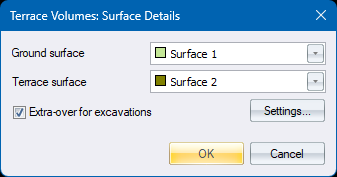
|
Option
|
Description |
|
Extra-over for excavations |
Check to incorporate extra-over cut quantities for excavations |
|
Settings |
Press to show the Terrain Extra-over Details Dialog for selection of surfaces for extra-over excavations |
|
Option
|
Description |
|
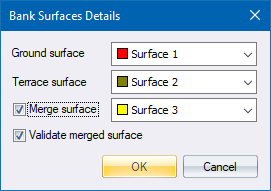
Ground surface |
Select the surface which contains the points/line model that define the ground or base surface. |
|
Terrace surface |
Select the surface which contains the points/line model that define the terrace surface. |
|
Merge surface |
Select this checkbox and select a surface in order to have the specified ground surface copied to the merge surface, which must be an empty surface, before the terrace merge takes place. Only available when merging the terrace and ground surfaces. |
|
Validate merged surface |
Select this checkbox to have Validate Model performed on the resultant merged surface. Only available when merging the terrace and ground surfaces. |
See Also Terrace Banks, Terrace Top, Terrace Volume, Terrace Merge, Delete Ground