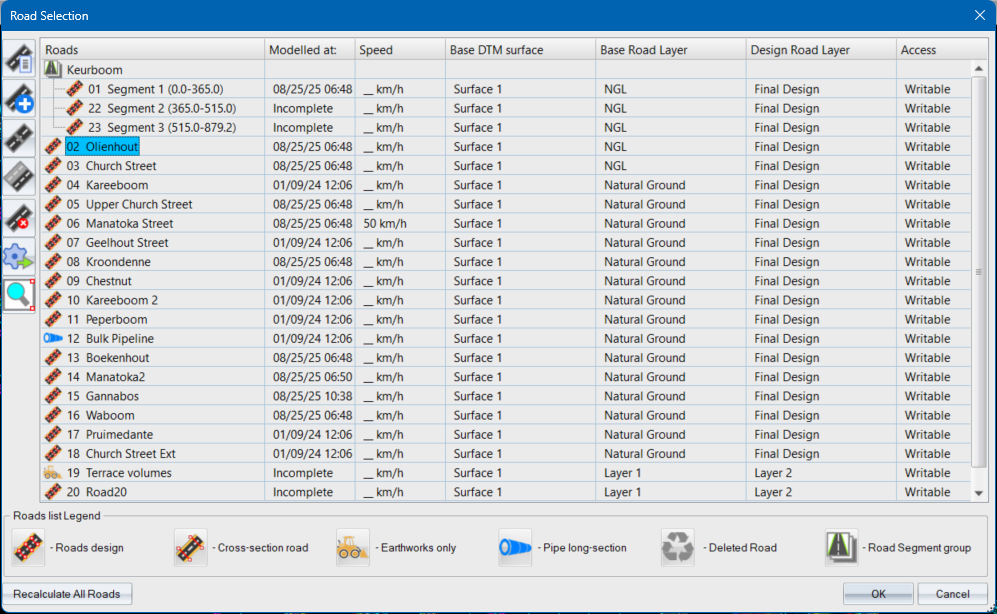
This window displays a list of all the roads in the project. It allows you to create a new road, copy a road's properties to a new file, delete an existing road, or modify the properties of an existing road.
|
Option
|
Description |
|
|
Click to edit the road using the Roads Control Centre. |
 |
Click to add a new road file. |
|
|
Click to split the selected road file into two road segments. |
|
|
Click to copy the selected road file to another road. |
|
|
Click to delete the selected road or segment. |
|
|
Click to recalculate the selected road |
|
|
Click to zoom into the selected road in the Drawing layout |
|
Road Listing |
Road names and numbers are listed here. The icons to the left of each road name defines what type of road it is. The same icons are used in the Control Panel and Display settings. The following read-only data is displayed in the spreadsheet:
|
| Roads list Legend | |
|
|
Old Cross-section Road. From Civil Designer 9.1, roads can no longer be modelled as Cross-section roads. Roads will be modelled as Strings roads whenever edge levels are being generated (Generate Edge Levels ) and templates applied (Apply Template). |
|
|
Normal roads design, modelled as a Road Strings . |
|
|
Roads containing cross sections for the purpose of calculating earthworks volumes. See Data Types (Basic Concepts) for more information |
|
|
Roads containing pipe long sections (Auto Manholes). Data Types (Basic Concepts) for more information |
|
|
Deleted Road that can be recycled. Road name will be drawn in grey. |
|
|
Road Group, which is a set of road segments using the same alignment. |
|
Recalculate All Roads |
Click to recalculate all the roads in the project. |


See Also Select Road File